
Device Management
Device Management maintains the registry of physical devices: connection parameters, point binding and acquisition state. It is also the entry point for write-back control.
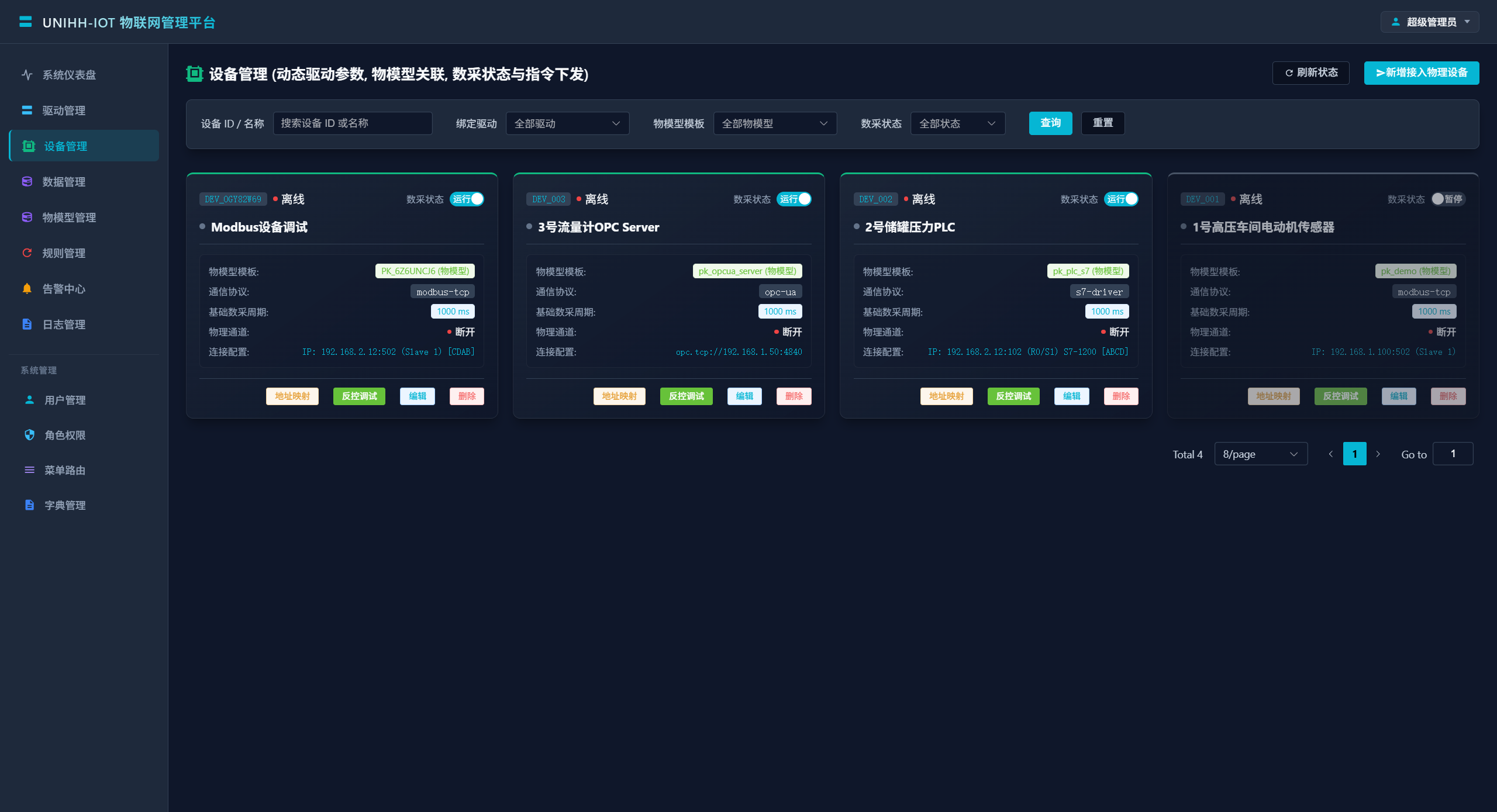
Finding Devices
Filters at the top:
| Filter | Description |
|---|---|
| Device ID / name | Fuzzy search |
| Bound driver | Filter by protocol driver |
| Thing model | Filter by bound model |
| Acquisition state | Running / paused |
Creating a Device
| Field | Description |
|---|---|
| Device unique ID | Globally unique; follow the field tag (e.g. PLC01) |
| Display name | Shown in lists and alarms |
| Thing model template | Determines available properties, services and events |
| Protocol driver | Must match the device's protocol |
| Base acquisition cycle | Polling interval in milliseconds; size it to the bus load budget |
| Driver connection params | Generated dynamically from the driver's schema (e.g. Modbus IP/port/slave ID, S7 rack/slot) |
On save, the platform pushes the configuration to the driver over MQTT and acquisition begins.
Point Binding
A thing model defines logical points (e.g. MotorTemp); device binding maps each one to a physical address (e.g. Modbus 40001). Configure per point in the device detail view:
| Field | Description |
|---|---|
| Logical point code | From the model's property list |
| Point name | Field-friendly label |
| Data type | FLOAT / DOUBLE / INT / INT32 / INT64 / BOOL / STRING / ENUM |
| Access | Read-only (R) or read-write (RW); only RW points accept write-back |
| Physical register address | Protocol semantics, e.g. Modbus 40001, S7 DB1.DBW0, OPC UA ns=2;s=Temp |
| Scale | Engineering value = raw × Scale + Offset |
| Offset | Applied together with scale for range conversion |
Tip
Scaling happens platform-side — drivers only report raw values. Example: a 0–100 °C range mapped to register values 0–32760 → Scale 0.003052, Offset 0.
Acquisition On/Off
Each device can be toggled independently:
- Running: the driver polls points on the configured cycle;
- Paused: registry and config retained, polling stopped — useful during maintenance.
Write-Back Control
Devices with RW points or control services accept commands directly from the device detail view:
By point
- Pick the target point (the dropdown lists only properties with RW access mode);
- Enter the target value and confirm.
The command travels gateway → admin center → EMQX (iot/driver/{code}/cmd) → driver. The driver executes the register write inside the channel lock, serialized against polling.
By service
If the thing model defines control services, pick a service, fill in its input parameters and dispatch — the right fit for compound actions like start/stop/reset.
Checking results
Every command leaves a trail (parameter snapshot, latency, result) under Log Audit → write-back command logs.
Lifecycle State
- When a driver goes offline, its devices are cascaded offline automatically;
- Physical link drops and recoveries are reported by the driver on
iot/device/statusand reflected in the registry.
Troubleshooting
No data after creating a device?
- Check the acquisition state is running;
- Check the driver is online (Driver Management);
- Verify connection parameters (IP, port, slave ID / rack-slot) against the field;
- Open Data Monitor and look at quality — Quality=0 means the link works but reads fail; suspect the register address first.
Write-back command fails?
- Confirm the point's access mode is RW;
- Confirm the device is online and acquiring (a channel that cannot read will not write);
- Read the failure reason and latency in the write-back logs;
- On RS485, check for address conflicts and bus termination.